Build anything. Own everything. With us.
Your repo, your server, your agents — VB Kanban is the platform that runs them: installed on your own infrastructure, operated by us, and upgraded with new capability every month. Every card on the board is an agent session: it writes the code, reviews it, tests it, prices it — and stops at a merge gate only a human on your team can open.
Multi-workspace analytics dashboard
SCIM provisioning for enterprise SSO
Retry policy for stuck agent sessions
Notifications fix
Video generation issue
Call transcription STT integration
A chat/app builder is great for a weekend prototype. VB Kanban is built for the team after that.
One person, one prompt, one app — chat/app builders are genuinely good at that job. VB Kanban is a different tool, for the job that starts once a second person, a second month, or a review requirement shows up.
Every buyer has hit the same cliff: a prototype over a weekend, it works, export to a repo — and the tool stops helping, exactly when a second contributor, a real migration, a regression or a review requirement shows up.
The board knows whether it actually worked.
Every tool in this category records what an agent did. The board also records whether it worked — and that label is the input nobody else has.
Tap or hover any node or arrow. Solid arcs are shipped code paths — a real API or DB hop. The two dashed arcs are human decisions, and carry no packet.
The board labels every outcome, for free
Closed · reverted · rejected · sent back by review with a rework note · failed deploy. Those labels are a by-product of running the work, so there is no annotation step to skip and nobody to forget it.
The outcome labels the knowledge
Rework notes, failed deploys and error-state tasks are read straight off the board and extracted into facts with a root cause. They reach the next agent's task prompt as contraindications — an explicit "do not do the thing described", never an example to follow. Shipped: VBK-1775.
Nothing writes to memory directly
Every write proposes: evidence, validity dates, deterministic supersession, a tombstone so a deleted fact cannot be re-learned, and a promotion gate before anything reaches the team wiki. Reads are scoped at retrieval, not left to the model.
Better precision at under half the tokens of dumping everything in. Four cases — small, and we would rather say it than have you find it. Deterministic labelled ground truth, not an LLM judge; regenerate it yourself with `php artisan coding-agent:eval-report`. The posture matters as much as the number: we run control arms against our own memory system and commit the report to the repo.
The design follows published 2026 work on governed agent memory. The numbers above are ours.
An assistant ingests what people already wrote and never learns whether it was right. A ticket tracker owns the board but not the runtime. An IDE agent owns the runtime but not the board. We own both ends of the arrow.
Everyone else added a chat. We made the card the session.
A chat-on-a-board tool drafts text for a human to carry out. On VB Kanban, the card is the agent's working session — it has a shell, a checkout, and a real turn budget, not a comment box.
Everyone else added a chat to their board. We made the card the session — and put a merge gate at the end of it.
The agent doesn't start by writing code — it starts by drawing what it intends to build.
Wireframes, architecture and decision diagrams, on a real vector canvas, created by the agent through the board's own tools and edited by a human in the same view. Nothing gets built until a human approves the shape of it — a design → approval → implementation loop no chat builder and no ticket tracker has. The two canvases below are a worked example of that output: real designs live in your instance and stay there, so what a public page can show is the shape of the artefact, never someone's board.
The agent creates a design and draws on it via MCP tools — or a human sketches directly on the same canvas. Either can keep editing.
The agent calls submit_design_for_review — the only status transition it has. A human sees Approve or Send back for rework, with an optional note delivered back as a comment.
The canvas becomes read-only, an immutable snapshot is recorded, and Implement design creates the build sub-task. Writes to an approved scene are rejected outright — reopening is a deliberate human click, never a side effect of a stray keystroke.
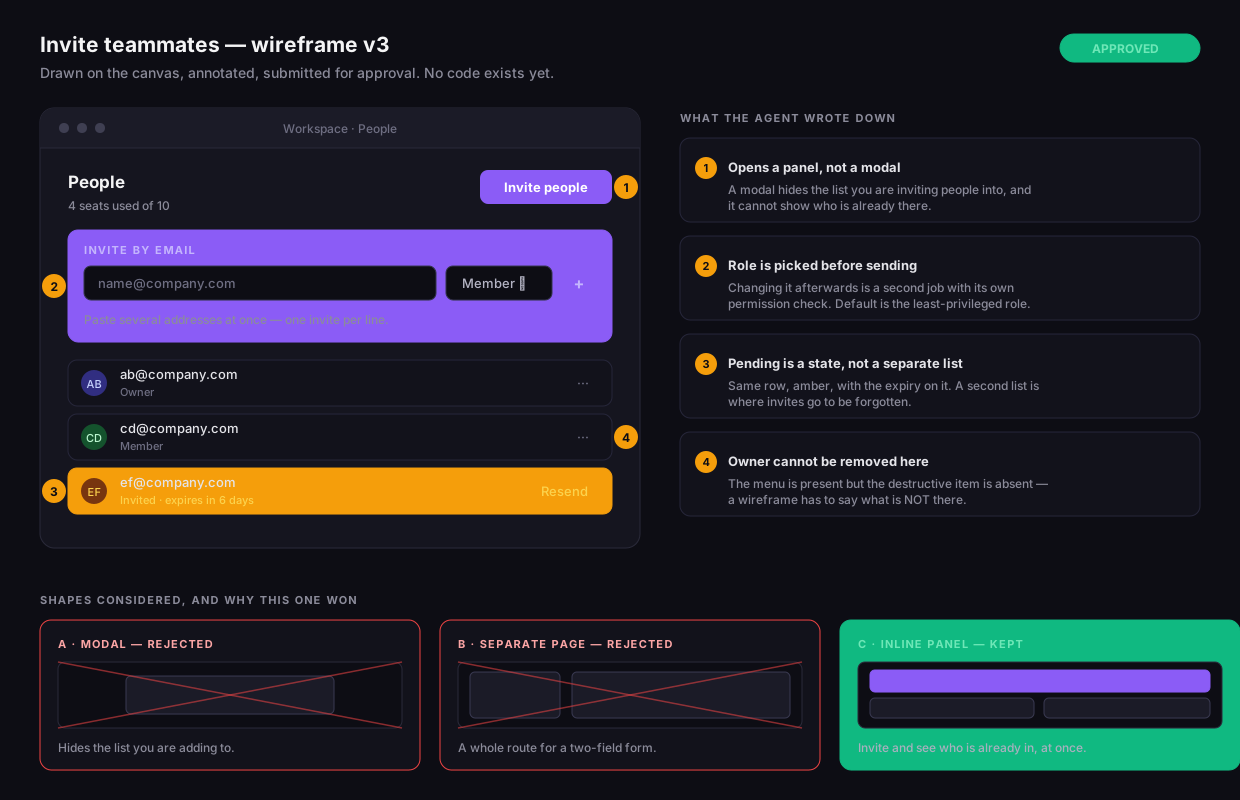
Designs are vector scenes on an embedded drawing surface — shapes, text, arrows, groups — created through the board's own MCP tools (create_design, update_design_scene) and editable by a human in the same view.
An approved design's scene is handed to the implementing task as compact JSON — geometry and labels — not a rendered PNG. The next agent reads coordinates and text directly; a human still sees the picture on the canvas.
Every scene edit and every status change appends to an append-only history. Clicking Implement design twice refreshes the same build sub-task to the current version — it never forks a duplicate.
The full task lifecycle — a rail, not a chat log
Every card walks the same nine columns a human sees on the board. Tap or hover a stage to see what actually happens there.
A real tmux session kb-{uuid} runs the agent CLI inside your own checkout; the log streams to the card over a WebSocket, line by line.
The safety nets underneath
Two independent levels check for a dead session or a stalled log before anything is left stuck: an in-process check every ~3 seconds, plus a safety-net tick scanning for a dead tmux session or a pane.log that stopped growing.
A wider sweep runs every 10 minutes underneath the watchdog, covering running, queued and coordinating tasks — the net for the case a handler itself hangs and nothing else is watching that task anymore.
A configured per-task or per-day USD limit is checked before a turn is even allowed to start — a run that would exceed it is sent back with an alert instead of being left to run up a bill.
Who does the work
claude -p --output-format stream-json --permission-mode bypassPermissionsopencode run --format jsoncodex exec --json --dangerously-bypass-approvals-and-sandboxgemini --output-format json --approval-mode yolo --skip-trustModel selection reads a catalog of executors and models per board — an admin can restrict which of the four are offered. Planning rules (Admin → AI → Planning) decide which executor/model a new sub-task gets, so one board can have an expensive model plan and a cheap one execute the sub-tasks it hands out.
One board. Everyone's machines.
Everyone points the desktop app at the same board. The card, the columns and the review gate stay shared — what changes is whose machine does the work, and whose agent subscription pays for it.
Headless, always on, isolated git worktree per task.
Queued work, overnight runs, anything nobody needs to watch.
The desktop app finds the agent CLIs already installed there — including ones inside WSL on Windows.
The card someone wants to drive themselves, with their own keys.
Ollama and LM Studio are detected the same way, with the models that machine can actually serve.
Work that is not allowed to leave the building.
- Claude CodeCLIcan run
- OpenCodeCLIcan run
- CodexCLIcan run
- GeminiCLIcan run
- Ollamalocal modelscan run
- LM Studiolocal modelsdetected
Found by asking each one for its version — on Windows, including the ones installed inside WSL, which is where most of them actually live.
The agent that runs on a laptop is the one already installed there, signed in as that person. The board never holds their model credentials.
Keychain, DPAPI or libsecret through the OS itself. Where the OS can't encrypt, the app says so in the interface instead of pretending.
It goes to the agent over stdin, never assembled into a command line — so a task's own text can't become an argument to the agent.
A local run's prompt states that it is on a person's machine, not an isolated server worktree, so it treats destructive commands accordingly.
Same board, same rail, same human merge gate — whether the work ran in a data centre or on a laptop at a kitchen table.
A repo and a box. Everything else keeps arriving.
The agents are yours — your repo, your keys, your server. VB Kanban is the platform we install on it and keep operating: new capability lands in your running instance, not a separate upgrade project.
Any stack — Laravel, Next.js, Expo, Go, Rust, a monorepo. The agents run your repo's own build, test and deploy commands, so no framework is imposed.
One you control — the board, its database, and every agent session run there.
Bring credentials for any of the 4 supported agent CLIs — Claude Code, OpenCode, Codex, Gemini — or use ours.
The database, the backend, the frontend, and the tmux runner — stood up and kept current.
Workspace path, columns, the board prompt, executor and model catalog, budget limits.
The serial queue, the two-level watchdog, git-worktree isolation, the AI-review and AI-testing phases.
The curated MCP tool surface and skill catalog every agent session gets on this board.
20 sections across Board, Agent, AI and Admin.
Agentless DevOps probes of the servers the board itself runs on.
Database backup history and age, tracked and alerted on.
A person on call for the platform, not a ticket queue.
VB Kanban is built by VB Kanban. Its own roadmap runs on its own board — every commit that ships this platform carries the task id that produced it.
The capability you get next month is the work you can watch on a board today.
No upgrade project — new capability lands in your running instance as it ships.
No migration — nothing to move, nothing to schedule.
No vendor lock-in — the database, the repo and the memory stay on your machine.
A dedicated engineer and monthly support come with the platform — which is why this isn't a signup form.
Every task gets cheaper the longer the board runs.
Agent work runs in a loop — read context, act, read the result, act again — and every token in that context is billed again on the next iteration. Memory shortens that loop; the panel below proves it, task by task, not our word for it.
The two factors multiply, not add — moderate progress on each is a large move on the bill.
The board's memory grows with your repo's history, so the same class of task costs less on month six than on month one.
Cost optimisation is a permanent line of work here, and it ships into your instance as a release — no upgrade project to get it.
A claim about falling costs is only worth something if you can audit it. The panel below is the receipt, on your own board.
A single 0–100 score blending continuation share, cache reuse and today's budget burn — not hand-computed from a token export.
Every session is tagged fresh or continuation, and the dashboard compares their average cost in dollars.
Share of input tokens served from cache instead of sent fresh — the single biggest lever on turn cost.
Every token-usage row is joined back to the task and session that produced it, board by board.
A configurable per-task and per-day USD limit stops a run before it starts, instead of overspending quietly.
Per-task and per-day USD limits are checked before a turn starts — over budget stops the run with an alert instead of quietly spending.
Agent work costs real money. The question is whether it's governed and falling, or metered and flat.
The platform watches the servers it runs on.
One agentless probe script runs over SSH against every registered server — nothing is installed on the target host. Every rule below exists because of a real incident, not a guess.
Every rule requires several consecutive breaching samples before it fires, and re-notifies at most once per cooldown window — a single spike during a deploy never pages anyone. Skip that discipline and an alert channel eventually gets muted exactly like the monitoring it replaced, which defeats the point of building one.
Accumulated silently across roughly two months before anyone counted them by hand. One of 3 incidents like it — each is the reason one alert rule exists.
The same board that ships your features also watches the box it ships them from — and when a threshold breaches, it doesn't page a wiki, it files the alert as a card.
Self-hosted isn't a compromise here — it's the whole point
Your code, your agents and their memory never leave your infrastructure. What VB Kanban adds on top is the governance and audit trail a team actually needs to let agents run there.
- Self-hosted or private cloud — your code, your agents, and the memory they accumulate never leave your infrastructure.
- Turn on git-worktree isolation and every task gets its own working directory and branch, so concurrent agents never trample each other's checkout.
- Nothing reaches your integration branch without a human doing the merge — an agent has no tool that can merge instead of asking for review.
- Three roles: admin and product_manager see every board and the full admin panel; a plain user only sees boards explicitly granted to them.
- Passwords are stored scrypt-hashed — never in plain text.
- Secrets in the admin API are masked to "••••" plus the last 4 characters; only one guarded endpoint can reveal the real value.
- A configured per-task and per-day budget is checked before a turn starts — a run that would exceed it is stopped and sent back with an alert instead of overspending overnight.
- One insert-only audit_log records who — human, agent, or system — did what, to what, and when.
- Every MCP tool call an agent makes is logged automatically, alongside every deploy and task-lifecycle event.
Frequently asked questions
Every answer here traces back to a section above — this is the short version. Tap a question to open it.